Contributing
Guidelines for contributing to FPL.
Requirements
- Fortran 90 only — no F2003+ features (
class,type-bound procedures,abstract interfaces, etc.) - GFortran (any recent version)
- NetCDF-Fortran libraries
Code Conventions
Intent Declarations
All subroutine/function arguments must have intent specified:
subroutine example(input, output, both)
  integer, intent(in)    :: input
  integer, intent(out)   :: output
  integer, intent(inout) :: both
Allocation Safety
Always use stat= with allocate / deallocate and check with check_alloc:
integer :: istat
allocate(array(n), stat=istat)
call check_alloc(istat, "array")
Loop Order
Fortran uses column-major storage. Always iterate with the first index in the innermost loop:
! Correct
do j = 1, nlats
  do i = 1, nlons
    data(i, j) = ...
  end do
end do

! Wrong — causes cache misses
do i = 1, nlons
  do j = 1, nlats
    data(i, j) = ...
  end do
end do
No system() Calls
Use pure Fortran I/O instead of call system(...). See print_filename in FPL_checkerror.f90 for an example.
Type Naming
Follow the existing convention:
nc{D}d_{type}_{coord}[_t{ttype}][_l{ltype}]
Workflow
- Fork the repository
- Create a feature branch from
dev - Write your changes following the conventions above
- Test by compiling the library and running the examples
- Submit a pull request to
dev
Building & Testing
make          # Build libFPL.so
make examples # Compile example programs
Code Generation
Source files are generated using CPP preprocessor templates. The system has two layers:
- Template files (
src/templates/*.inc) — Fortran source with CPP macro placeholders, maintained manually - Generator script (
src/generate_cpp.py) — Produces.f90files with#define/#include/#undefblocks
If you modify a template or add a new data type variant, regenerate and rebuild:
python3 src/generate_cpp.py
make clean && make
See the Code Generation section below for details on the template system.
Code Generation Architecture
Pipeline Overview
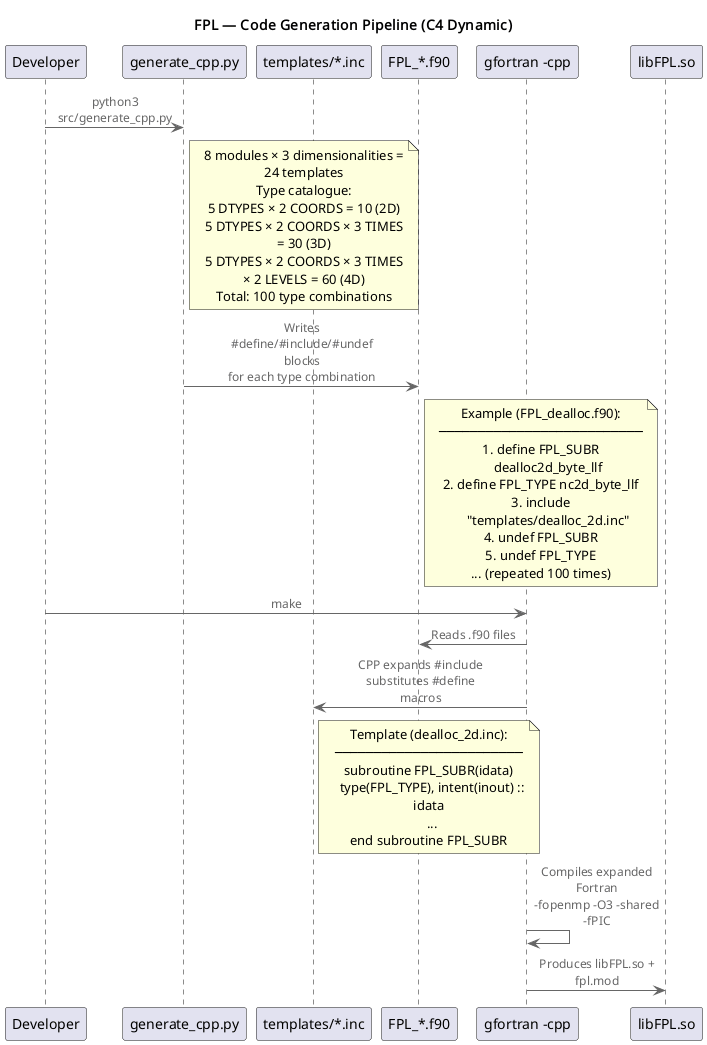
How it works
Each .inc template file contains a single Fortran subroutine (or type definition) with CPP macro placeholders instead of concrete type names:
! src/templates/dealloc_2d.inc
subroutine FPL_SUBR(idata)
  type(FPL_TYPE), intent(inout) :: idata
  integer :: alloc_stat
  deallocate(idata%longitudes, idata%latitudes, idata%ncdata, stat=alloc_stat)
  deallocate(idata%dimid, idata%dimsize, idata%dimname, idata%dimunits, idata%varids, stat=alloc_stat)
end subroutine FPL_SUBR
The generator script (generate_cpp.py) produces .f90 files that instantiate each template for every type combination:
! Generated in FPL_dealloc.f90
#define FPL_SUBR dealloc2d_byte_llf
#define FPL_TYPE nc2d_byte_llf
#include "templates/dealloc_2d.inc"
#undef FPL_SUBR
#undef FPL_TYPE

#define FPL_SUBR dealloc2d_byte_lld
#define FPL_TYPE nc2d_byte_lld
#include "templates/dealloc_2d.inc"
#undef FPL_SUBR
#undef FPL_TYPE
...
CPP macros used
| Macro | Used in | Description |
|---|---|---|
FPL_SUBR | All except datatypes | Subroutine name |
FPL_TYPE | All | Derived type name (e.g., nc2d_byte_llf) |
FPL_FILL_DECL | datatypes | Fill value declaration (e.g., integer(kind=byte)) |
FPL_COORD_KIND | datatypes | Coordinate kind (e.g., float, double) |
FPL_TIME_DECL | datatypes (3D/4D) | Time declaration (e.g., integer(kind=intgr)) |
FPL_LEVEL_DECL | datatypes (4D) | Level declaration (e.g., real(kind=float)) |
FPL_LABEL | readgrid | Type label string for error messages |
FPL_NF90_VARTYPE | gengrid | NetCDF variable type constant |
FPL_NF90_COORD | writegrid | NetCDF coordinate type |
FPL_NF90_TIME | writegrid (3D/4D) | NetCDF time type |
FPL_NF90_LEVEL | writegrid (4D) | NetCDF level type |
FPL_MASK_TYPE | setfillvalue | Mask type (always 2D) |
FPL_MAP_TYPE | setfillvalue | Map type (matches subroutine dimensionality) |
FPL_ZONE_TYPE | zonalstats | Zone/classification grid type (always 2D byte) |
FPL_DATA_TYPE | zonalstats | Data grid type (matches subroutine dimensionality) |
Template files
| Template | Macros required |
|---|---|
datatypes_{2d,3d,4d}.inc | FPL_TYPE, FPL_FILL_DECL, FPL_COORD_KIND [+FPL_TIME_DECL] [+FPL_LEVEL_DECL] |
dealloc_{2d,3d,4d}.inc | FPL_SUBR, FPL_TYPE |
griddims_{2d,3d,4d}.inc | FPL_SUBR, FPL_TYPE |
readgrid_{2d,3d,4d}.inc | FPL_SUBR, FPL_TYPE, FPL_LABEL |
writegrid_{2d,3d,4d}.inc | FPL_SUBR, FPL_TYPE, FPL_NF90_COORD [+FPL_NF90_TIME] [+FPL_NF90_LEVEL] |
gengrid_{2d,3d,4d}.inc | FPL_SUBR, FPL_TYPE, FPL_NF90_VARTYPE |
setfillvalue_{2d,3d,4d}.inc | FPL_SUBR, FPL_MASK_TYPE, FPL_MAP_TYPE |
zonalstats_{2d,3d,4d}.inc | FPL_SUBR, FPL_ZONE_TYPE, FPL_DATA_TYPE |
Adding a new template
To add a new module (e.g., interpolate):
-
Create the template files in
src/templates/:src/templates/interpolate_2d.inc
src/templates/interpolate_3d.inc
src/templates/interpolate_4d.incUse CPP macros (
FPL_SUBR,FPL_TYPE, etc.) as placeholders. -
Add a generator function in
src/generate_cpp.py. For simple modules that only needFPL_SUBRandFPL_TYPE:gen_simple("interpolate", "interpolate")For modules that need extra macros, create a dedicated function (see
gen_writegrid(),gen_setfillvalue(), orgen_zonalstats()as examples). -
Add the
#includeingen_fpl()insidegenerate_cpp.py:#include "FPL_interpolate.f90" -
Add the interface in
gen_interfaces()insidegenerate_cpp.py. -
Regenerate and rebuild:
python3 src/generate_cpp.py
make clean && make